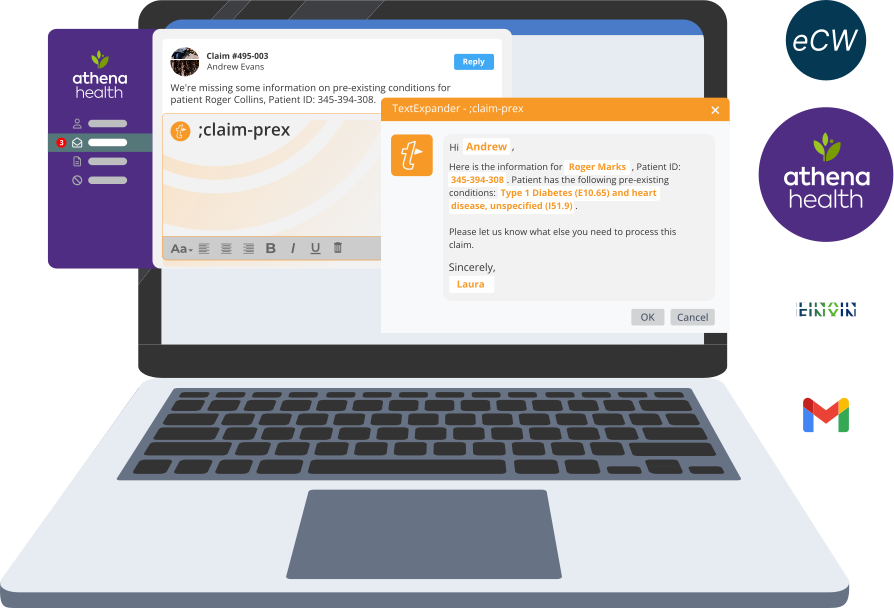
Your Denial Rate is a Typo Problem

Typos shouldn’t cost you thousands in denied claims, but every day, they do. Solve the problem at the source with shortcut-enabled templates that work across practitioners, coding, and billing teams.

The best teams know the best shortcuts

Trusted by thousands of healthcare professionals

Clean claims are a shortcut away

End-to-end consistency

Centralize payer-specific documentation requirements, CPT/ICD-10 sequences, and medical necessity statements so every claim is submitted correctly the first time.

Resolve appeals faster

When denials happen, your team can respond with pre-approved appeal templates, denial responses, or authorization requests with a few keystrokes.

Bridge the knowledge gaps

Humans stay in control of documentation, but get access to the right information faster. Admins manage the content and billing instructions that get shared across multiple teams.

Audit-ready and already integrated

TextExpander is HIPAA compliant and works with all EHRs and RCM software.

Fix the root cause of denials:
Inconsistent documentation

50% of providers report that missing or inaccurate claim data is the #1 factor contributing to rising denial rates.

How TextExpander can help:

1

Centralize your requirements

Create a library of templates for ICD-10/CPT sequences, payer-specific documentation, and medical necessity statements that your entire team can access.

2

Guide through completion

Your team types a short abbreviation, and TextExpander expands it into a structured template with fill-in fields, prompting them for every required data point.

3

Submit clean claims

Whether your team uses Epic, Cerner, athenahealth, or any other system, the same standardized documentation deploys everywhere, reducing errors that cause denials.

See how TextExpander works

Hello,
I hope this finds you well and thank you for your email. We’ve forwarded your request along to our sales representatives who can help you explore the best options for your team. Please let us know if we may help with anything else in the meantime.

Thank you!
John

John Smith
TextExpander Customer Service Representative
TextExpander.com

Reach out:
support@textexpander.com

Learn more about TextExpander or sign up for an account:
textexpander.com

Connect with us on social:
twitter.com/TextExpander
facebook.com/TextExpander
linkedin.com/company/TextExpander

Thanks for reaching out to learn about how to create a Snippet group; we can certainly help with that! I’ve included the instructions below for you. Let us know if you need anything else, and feel free to check out our learning center for more TextExpander tips!

Creating a New Snippet Group
To create a new Snippet Group, choose the New Group icon to the right of the search bar in your TextExpander app or choose File > New Group from the menu bar.

You can add Snippets to the group by choosing the New Snippet icon in the toolbar or choose File > New Snippet from the menu bar. You can also drag snippets from one group to another. See Creating, Editing, Deleting Snippets for more details on creating Snippets.

Great to hear from you! The best way to schedule a time to chat is via my Calendly Link. Feel free to select a 30-minute window that fits with your schedule and I look forward to speaking soon.

Wins for the Week:

  •  

Top Priorities:

  •  

Blockers:

  •  

Discussion/Notes:

  •  

Case Study

See how each member of Virta Health’s Care Team saved 24 days per year with TextExpander

Read the case study

Now we have a system for creating and updating the messaging our coaches use as a framework to communicate with our members, with personalization top of mind.

Kristin Hullett, Care Operations Senior Associate at Virta Health

Case Study

How Amwell’s support team eliminated template chaos and saved thousands of hours with TextExpander. 

Webinar

Healthcare Virtual Summit

Blog

How Virtual Patient Engagement Is Reshaping Healthcare Operations

Healthcare organizations save time with TextExpander

2420+

working days saved by TextExpander users in healthcare

3.4M

snippets expanded by professionals in healthcare

79

hrs. saved on average per healthcare professional in the past year

$11K

Dollars saved per employee per year

Top users are top 10% of TextExpander customers. Numbers assume 50 WPM typing speed and an average salary of $30/hour.

TextExpander works in any platform

Our customers love us (and you will too)

Now we have a system for creating and updating the messaging our coaches use as a framework to communicate with our members, with personalization top of mind.

My team and I use TextExpander 24/7 365! It saves us hundreds of hours and helps us avoid spelling and grammatical errors while remaining professional and uniform in our communications across the board! Our patients always receive friendly, clear, professional, and timely responses from us because we use TE for our email scripts. Thank you, Text Expander, for being our most utilized tool for efficacy, organization, and time management!!

TextExpander allows me to create detailed instructions that do not have to be recreated for each patient. Whether it is safety, or prescribing instructions or safety plans. I can easily add them to the body of a note and save time.

Easy to create snippets and edit them, saves me a lot of time on documentation while also allowing me to provide detail. If your facility creates snippets you can also copy them to your own and change the abbreviation so that it is easier to remember. I use this every day, every chart!

What I love about TextExpander is that it saves me so much time with repetitive details of my job. It’s wonderful how a snippet will save me time and the trouble of writing everything out completely. I also love that I am able to share my snippets in my work environment and vice versa.

Like using dot phrases but just typing shortcuts.

No more monotonous writing in chats and emails. Very user friendly as you can figure out things by yourself. I do not need to spend time writing the same thing again and again as I have to answer to similar questions everyday. I can use it even in intercom and other websites for usual templates.

As a health care provider, documentation is my least favorite thing. In my current EMR there are no macros. I saved an average of 6 to 10 hours/week using TextExpander. Set up was easy. And it is incredibly affordable. I use it daily.

Extremely easy to set up & train team on, and then once the team was trained we are able to use it every day! We can use it in Salesforce, Microsoft Office, or literally any other text box. It allows us to standardize language and save time. Customer Support has been great as well in helping us troubleshoot problems.

I like that textexpander is easy to use and the interface is very user-friendly. It was easy to implement in my daily tasks and helped me to be more efficient. I use the app every single day because it helps me to get through my days with ease.

There’s revenue recovery in every keystroke

Inconsistent data entry is the source of your denials.
Start standardizing your documentation end-to-end with TextExpander.

 
G2 Best Software: Top 50 of 2025 Collaboration and Productivity Products
G2 High Performer Enterprise Summer 2025
G2 High Performer Mid-market Summer 2025
G2 Best ROI summer 2025
G2 Easiest Admin summer 2025